Revenue centers can be used to apply custom labels to each menu item for use when generating the end of day Revenue Center Summary or on custom reports. Additional revenue center features will be added in upcoming releases.
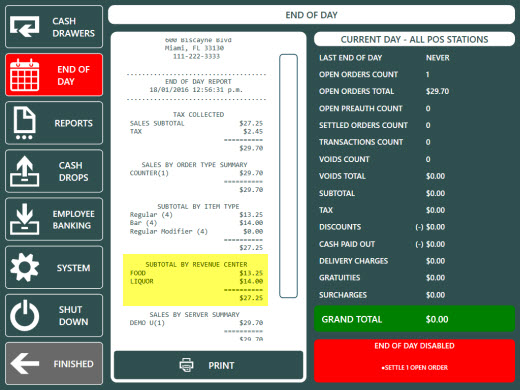
End of Day Report
The Subtotal By Revenue Center Summary can be enabled in Back Office | Settings | Main Settings | Manager Screen | End Of Day.
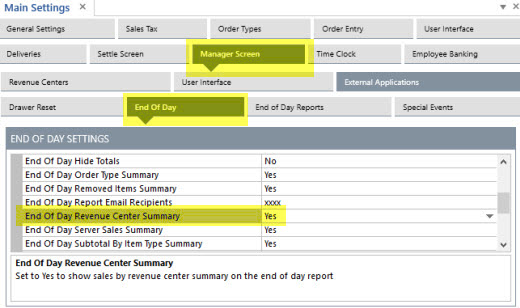
End of Day Report Settings
Revenue center definitions can be added, edited or deleted in Back Office | Settings | Main Settings | Manager Screen | Revenue Centers. Click the top row to add a new revenue center.
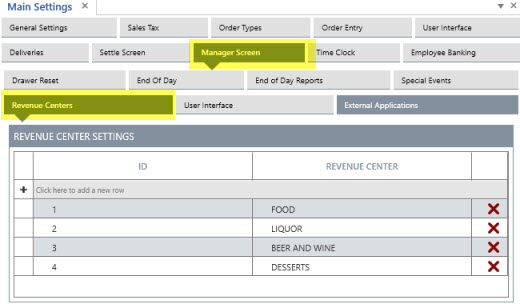
Revenue Centers Editor
After adding revenue center definitions, open the menu items list to assign a revenue center to each menu item.
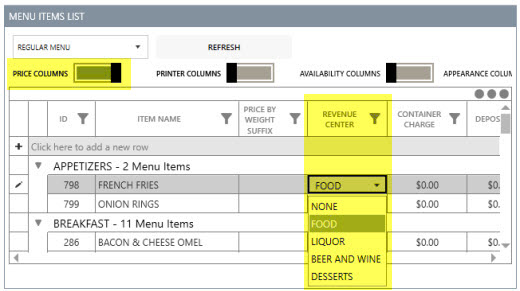
Menu Items List
A revenue center can also be assigned to each regular and bar menu item in the menu item editor.
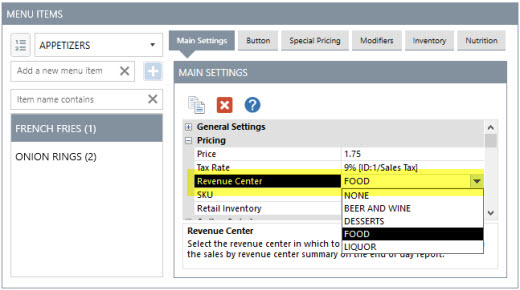
Menu Items Editor
A revenue center can be assigned to each regular menu modifier in the modifiers editor by selecting the modifier group at the left followed by the Modifiers tab at the top.
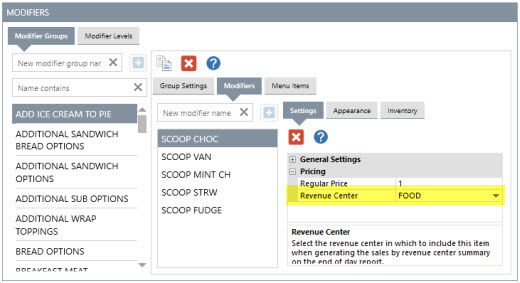
Regular Menu Modifiers Editor
A revenue center can be assigned to each bar menu modifier in the bar modifiers editor under the General Settings tab.
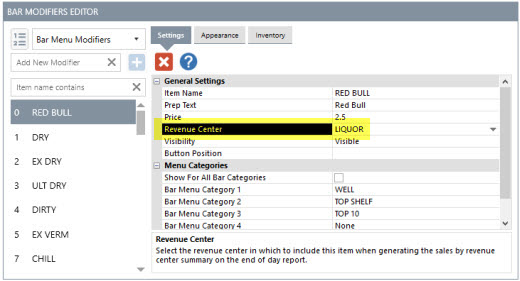
Bar Modifiers Editor